Literature Search
Literature reviews for CER, PSUR and PMCF, from search to signed report
Literature Search takes your team through a documented literature review: search strategy, deduplication, title/abstract and full-text screening, data extraction and a PRISMA diagram, ending in a signed report. Between reports, scheduled searches pick up only the articles you haven't seen.
What a device literature review has to show
Literature is a main source of clinical data for medical devices. Notified bodies check that the search can be reproduced and that every inclusion and exclusion is justified.
| Source | Topic | What it asks for | Where it applies | How Literature Search helps |
|---|---|---|---|---|
| MEDDEV 2.7/1 rev 4 | Annex 5: literature search and review protocol | A documented protocol: objective, search terms, databases, inclusion and exclusion criteria, how duplicates are handled | Clinical evaluation (CER) | Search strategy, criteria and dedup rules are kept with the project and versioned |
| MDCG 2020-13 | Clinical evaluation assessment report template | Notified body review of the search: terms, databases, criteria, duplicates, and the appraisal of each article | Notified body review of the CER | Every search run, decision and reason is in the audit trail and the report |
| EU MDR | Article 61 and Annex XIV | Clinical evaluation based on clinical data, including the state of the art and equivalent devices | CER, kept up to date with PMCF and PSUR | Device scope covers state-of-the-art, equivalent, similar and benchmark devices |
| EU MDR | Articles 83–86 | Post-market surveillance, including scientific literature, feeding the PSUR and PMCF | Throughout the device lifetime | Scheduled searches find new articles between reports |
Summary of MEDDEV 2.7/1 rev 4 Annex 5, MDCG 2020-13 and EU MDR Articles 61 and 83–86. Literature Search supports the review; your team decides on the evidence.
How Literature Search works
-
Set up the review
Choose the project type (CER, PSUR, PMCF or a standalone review), describe the device and its state-of-the-art, equivalent and benchmark devices, add the team and set the inclusion and exclusion criteria and extraction form.
-
Build and run the search
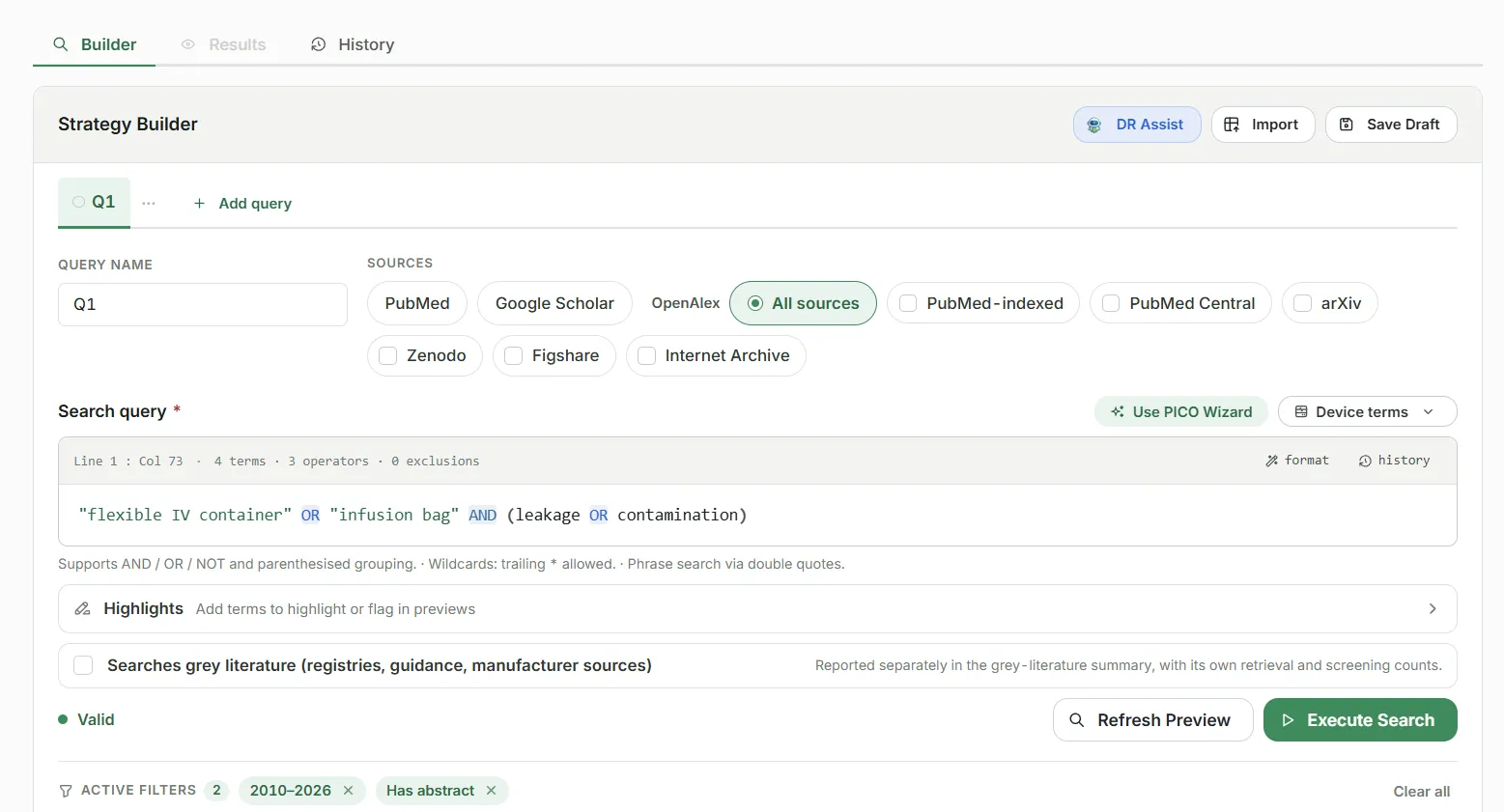
Use the PICO wizard or the Boolean editor, save several named queries, preview them, and run them against PubMed, Google Scholar and OpenAlex. AI can suggest or review queries.
-
Remove duplicates
Records are matched by DOI, PMID and near-identical titles. Reviewers can restore any record or change which one is kept, and each change is recorded, with the reviewer's reason if given.
-
Screen and extract
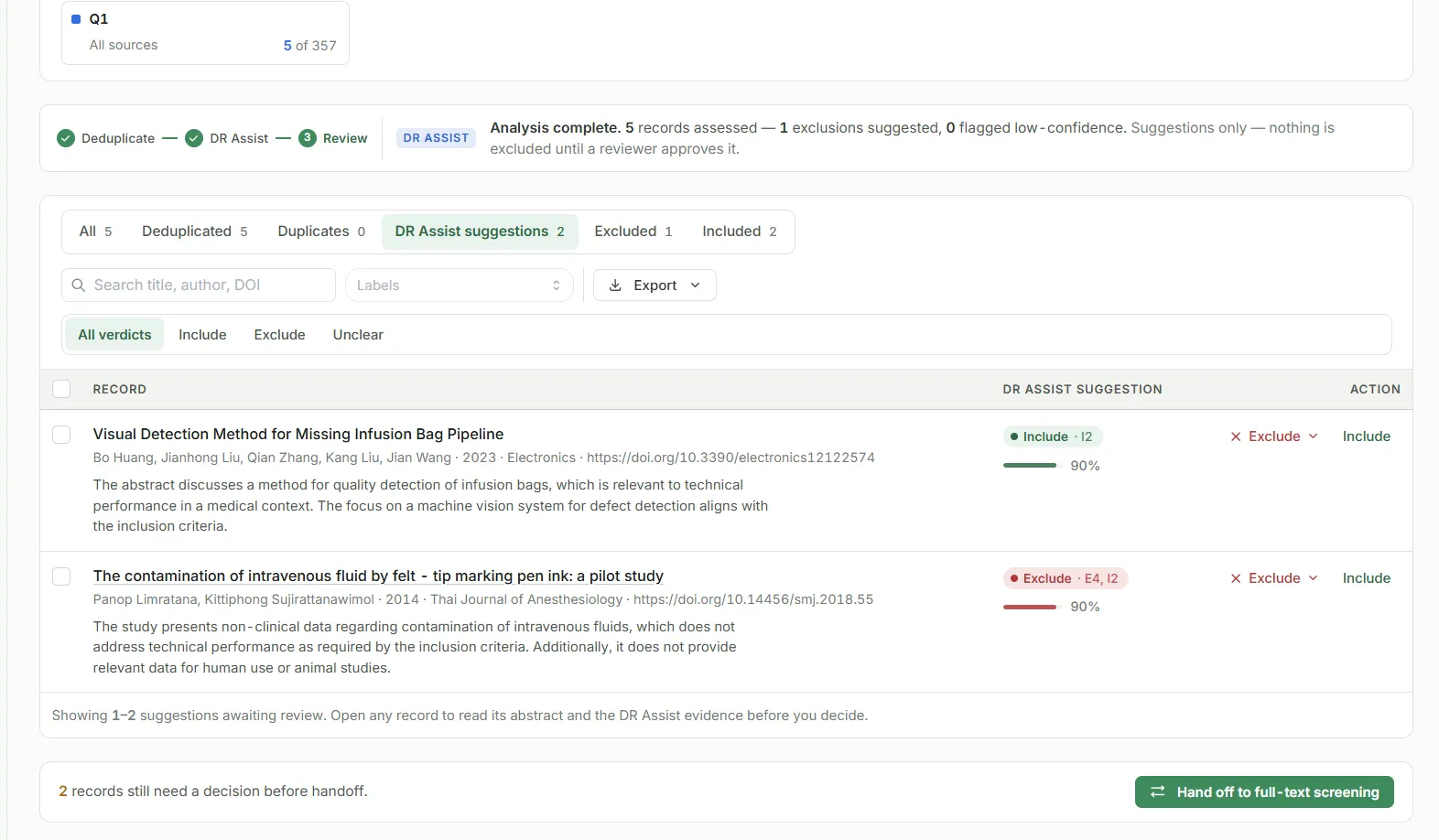
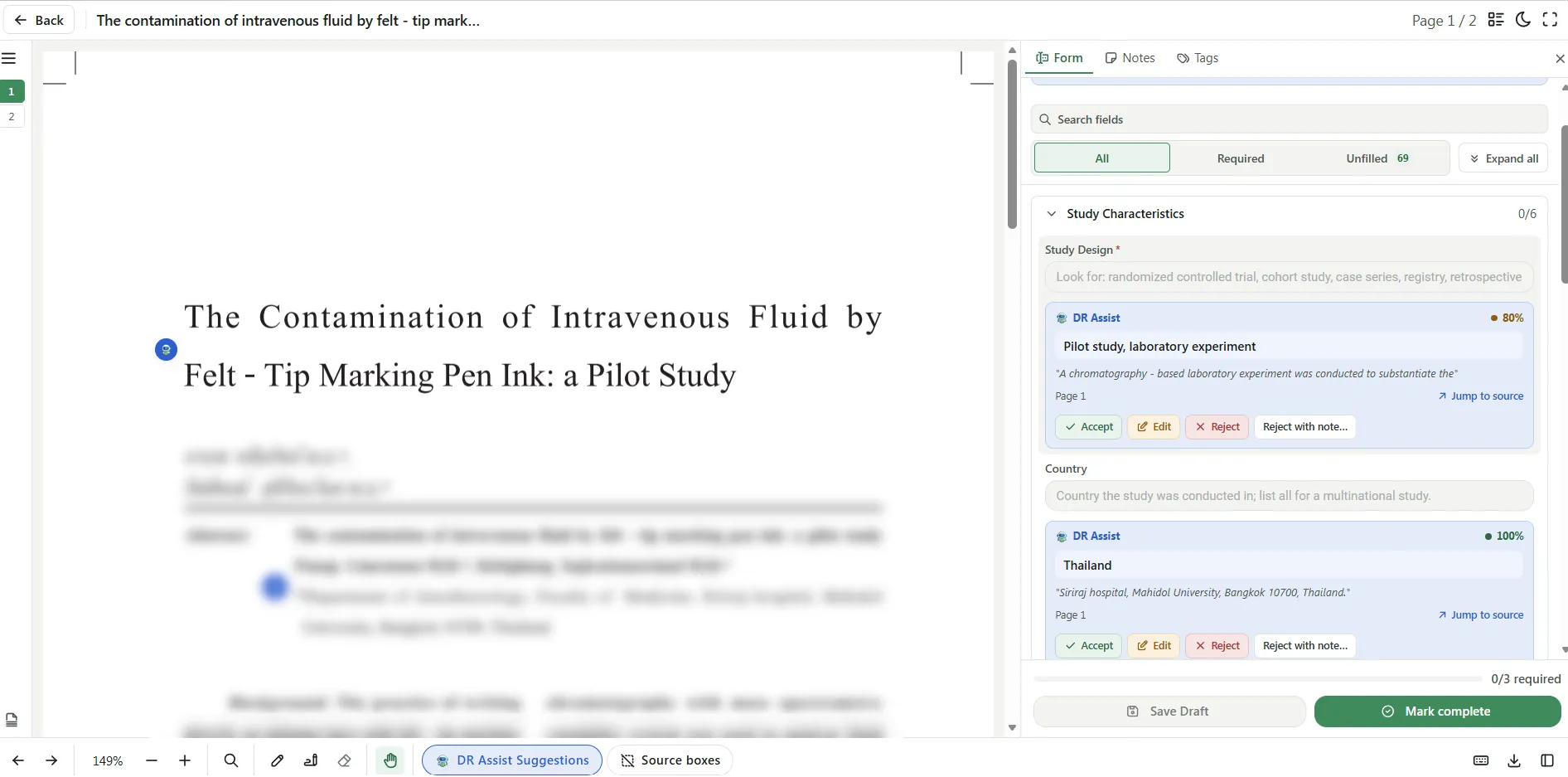
Screen titles and abstracts, then full texts, alone or with two reviewers and a consensus step. Full texts are retrieved automatically where open access allows. Extract data into your form, with the PDF beside it.
-
Report and keep it current
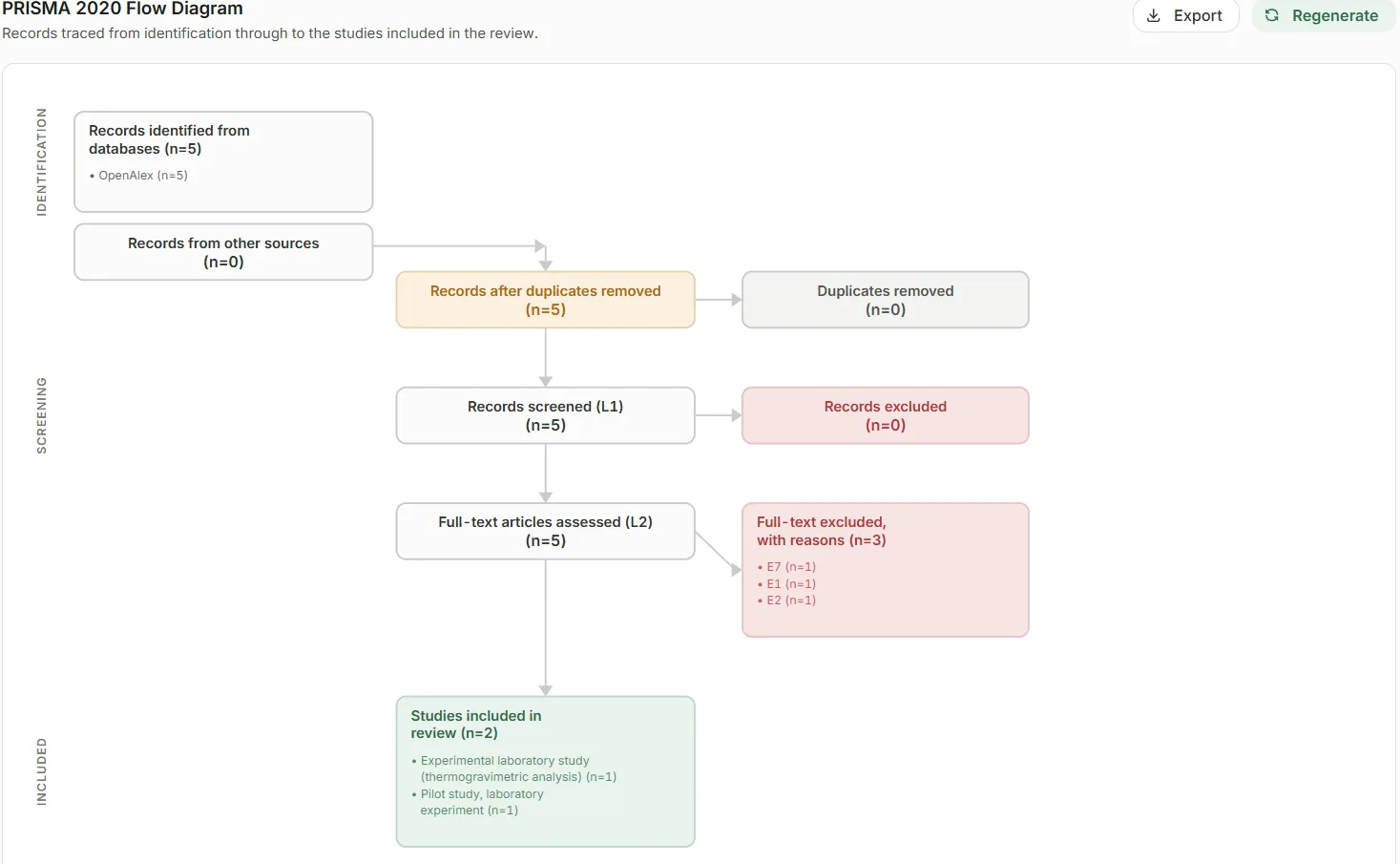
Generate the PRISMA 2020 diagram and a Word or PDF report, written and signed by your team. Scheduled searches then find new articles until the next report.
What Literature Search records for your audit
Every step leaves a record a notified body can follow, and every decision shows whether it came from a reviewer, an accepted AI suggestion, a consensus or the system.
| Step | Content | How it's filled |
|---|---|---|
| Search | Search strategy, queries and criteria, with versions | Kept with the project |
| Every search run and its results | Recorded automatically | |
| Deduplication | Records matched by DOI, PMID and title | Calculated |
| Restored records, and any reason given | Your reviewers | |
| Screening | Suggested decision, confidence and rationale | Suggested by AI, you can change it |
| Include or exclude, with a reason at full text | Your reviewers | |
| Conflicts between two reviewers and the consensus | Your reviewers | |
| Extraction | Pre-filled field values from the full text | Suggested by AI, you can change it |
| Accepted, edited or rejected for each field | Your reviewers | |
| Report | PRISMA 2020 flow diagram and exclusion counts | Calculated |
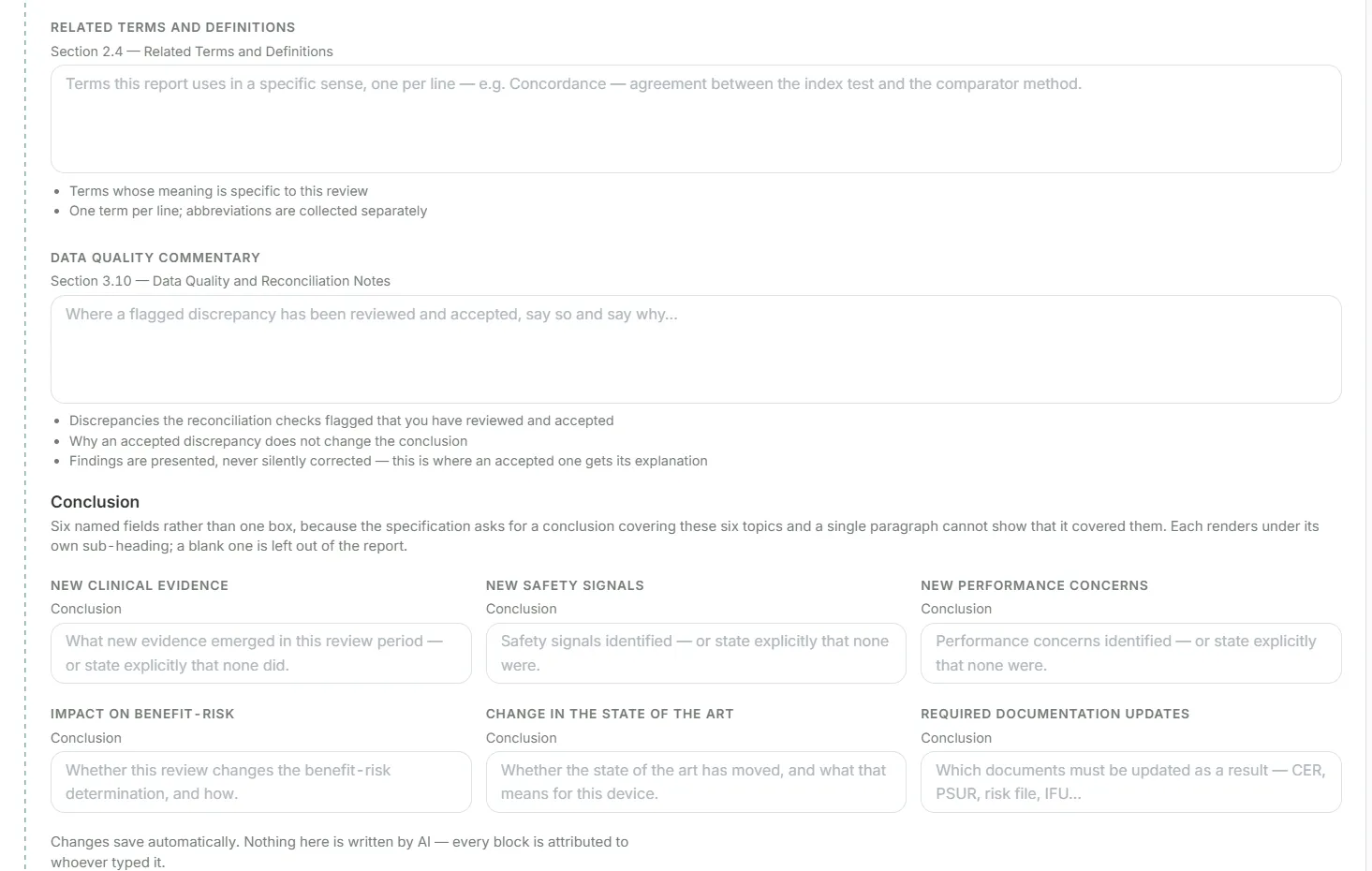
| Discussion, limitations and conclusions | Written by your team | |
| Prepared, Reviewed and Approved signatures | Signed by your team |
What you bring
Most of a review starts from what your team already knows about the device.
- The device and its scope
- Intended purpose, and the state-of-the-art, equivalent, similar and benchmark devices to search for.
- Your search strategy
- Built in the PICO wizard or Boolean editor, or imported from an Excel workbook.
- Inclusion and exclusion criteria
- Set once per project and versioned if they change.
- Your extraction form
- Start from the default for the project type and adjust the fields.
- Your team
- Reviewers, extractors, a consensus resolver, a report author and signatories, each with their own role.
- Full-text access (optional)
- Your document delivery account, if you want paid full texts ordered from the app.
What Literature Search does
Searches you can reproduce
PICO wizard, Boolean editor and named queries, with every run and its results kept in the project history.
Screening with reasons
Include, exclude or maybe at title/abstract; include or exclude with a structured reason at full text. Dual review with a consensus step.
AI that suggests, not decides
AI suggests screening decisions with a confidence and rationale, and pre-fills extraction fields. Your reviewers accept, edit or reject each suggestion.
Full texts, retrieved for you
Open-access PDFs are fetched automatically, any file can be uploaded, and paid document delivery can be used with your own provider account.
PRISMA and a signed report
A PRISMA 2020 flow diagram with exclusion counts, and a Word or PDF report with Prepared, Reviewed and Approved signatures.
Monitoring between reports
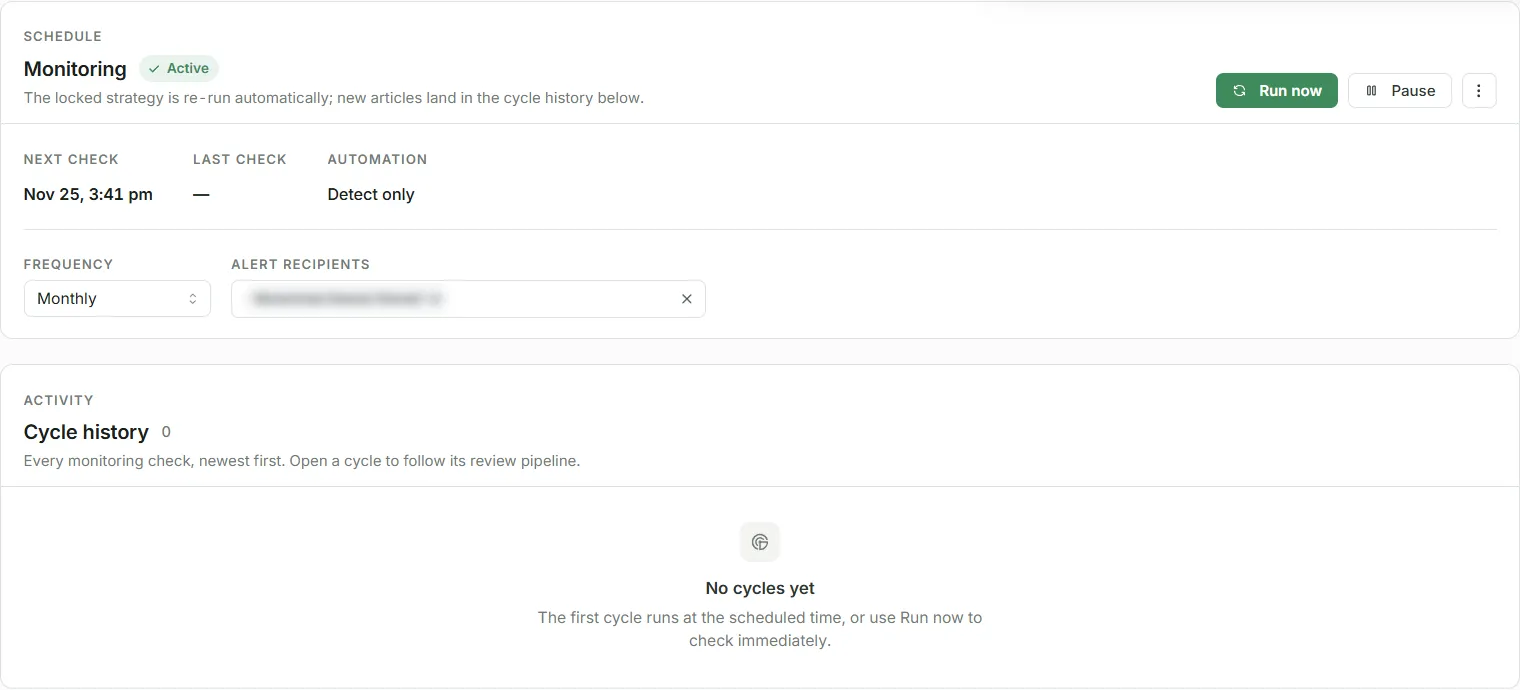
Searches repeat weekly, every two weeks, monthly or quarterly and bring back only articles you haven't seen, ready to confirm and screen.
Inside Literature Search
A literature review by hand vs with Literature Search
| Task | By hand | With Literature Search |
|---|---|---|
| Search record | Search strings and dates are copied into a document by hand. | Every query and run is saved with the project. |
| Duplicates | Removed in a spreadsheet, often without a record of what went. | Matched by DOI, PMID and title; every restore is logged. |
| Screening | Decisions and reasons spread across spreadsheets and emails. | Each decision, reason and reviewer in one place, with dual review and consensus. |
| Full texts | Searched for and downloaded one by one. | Open-access PDFs fetched automatically; the rest uploaded or ordered. |
| PRISMA diagram | Drawn by hand and recounted when anything changes. | Generated from the screening counts. |
| Between reports | The whole search is rerun and checked against last time. | Scheduled searches bring back only new articles. |
Common literature review mistakes
Notified bodies send these back again and again. This is how Literature Search handles each one.
A search no one can reproduce
The terms, databases or dates aren't written down exactly.
How Literature Search handles it: Queries, filters and every run are saved with the project.
Exclusions without reasons
Articles are dropped without saying why.
How Literature Search handles it: Every full-text exclusion takes a structured reason, and the PRISMA diagram counts them.
Duplicates removed silently
Nobody can tell which records were merged or why.
How Literature Search handles it: Matching rules are fixed, and every restored record is logged, with an optional reason.
No state of the art
The search covers the device but not the alternatives it is judged against.
How Literature Search handles it: The device scope includes state-of-the-art, equivalent, similar and benchmark devices.
One reviewer's judgement only
Borderline decisions aren't checked.
How Literature Search handles it: Dual review sends disagreements to a conflict queue and a consensus step.
Nothing new between reports
Literature isn't looked at again until the next CER or PSUR is due.
How Literature Search handles it: Scheduled searches bring back new articles weekly to quarterly.
Built for review
Every decision has an origin
Each decision shows whether it came from a reviewer, an accepted AI suggestion, a consensus or the system.
AI suggestions are reviewed
Screening and extraction suggestions are accepted, edited or rejected by your reviewers, and the record shows which.
Nothing is decided automatically
Monitoring finds new articles for a reviewer to screen, and AI suggestions are never applied without a reviewer.
Roles for every step
Project lead, reviewers, extractors, consensus resolver, report author, signatories and read-only viewers.
A full audit trail
Searches, decisions, deduplication, AI runs, schedules, reports and signatures are recorded and can be exported.
Signed reports
Reports carry Prepared, Reviewed and Approved signatures, and a finalised report keeps its revision history.
Literature Search questions
Which databases does Literature Search search?
PubMed, Google Scholar and OpenAlex. Search strategies can be built in the app or imported from an Excel workbook.
Is it built for medical device literature reviews?
Yes. Projects are set up for CER, PSUR or PMCF literature reviews, the device scope covers state-of-the-art, equivalent and benchmark devices, and extraction includes level of evidence, including MDCG 2020-6.
Does the AI decide which articles are included?
No. AI suggests a decision with a confidence and rationale; your reviewers decide. Scheduled monitoring only finds new articles; a reviewer screens them.
Can two reviewers screen independently?
Yes. With dual review, disagreements go to a conflict queue and are settled in a consensus step, and the record shows who decided what.
How does literature monitoring work?
You schedule a search weekly, every two weeks, monthly or quarterly. Each cycle brings back only articles that haven't been seen before, for a reviewer to confirm and screen.
What do we get at the end?
A PRISMA 2020 flow diagram, a Word or PDF report written and signed by your team, and exports of the results (CSV, RIS, BibTeX), the extraction (Excel) and the audit trail.
How are full texts retrieved?
Open-access PDFs are retrieved automatically. You can upload any file, and if you have a document delivery account, paid full texts can be checked and ordered from the app.
Does the AI write the report?
No. The report is generated from your project data and diagram, and the discussion, limitations and conclusions are written by your team.

Get in Touch With Us
Reach out to us for any inquiries or collaborations. We are eager to hear from you and discuss how we can assist in leveraging healthcare data solutions for your business.