PSUR Wizard
PSUR software for EU MDR, built on your own template
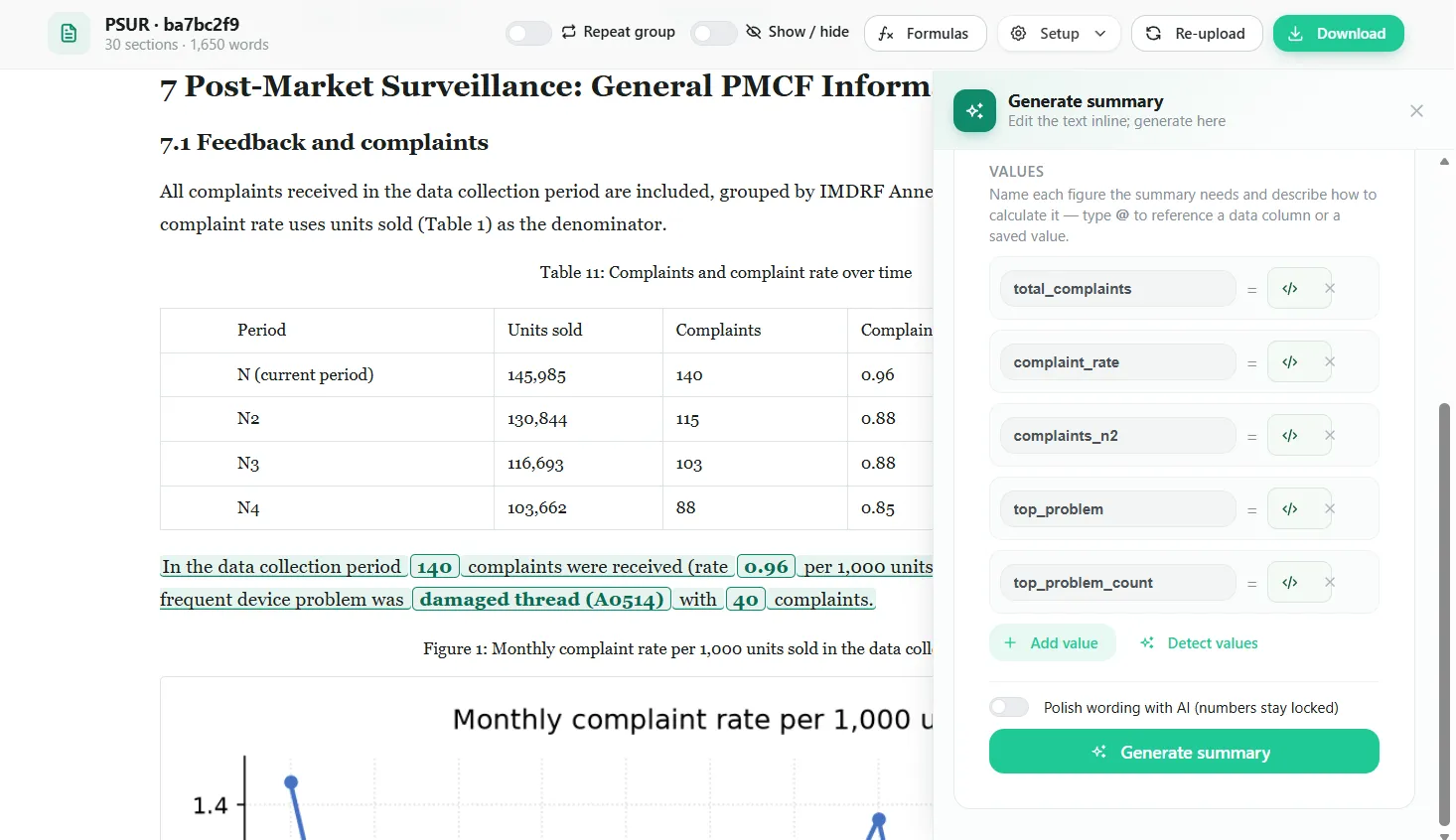
PSUR Wizard turns your PSUR template and this period's data files into a finished Periodic Safety Update Report. Tables, charts and the numbers in every summary are calculated from your sales, complaint and vigilance data. Your team reviews and edits the document in place, then downloads it in Word.
Who needs a PSUR
Article 86 of the EU Medical Device Regulation (MDR 2017/745) requires a PSUR for Class IIa, IIb and III devices. It summarises the post-market surveillance data for each device, or device group, over the reporting period, and the conclusions of the benefit-risk determination.
- Class IIb and III
- Updated at least every year
- Class IIa
- Updated when necessary, at least every two years
How PSUR Wizard works
-
Start from your PSUR template
We build your existing PSUR document into a template and publish it to your company. Its sections, tables, charts and summaries, and the formulas behind them, carry over to every report you create from it.
-
Set up the reporting period
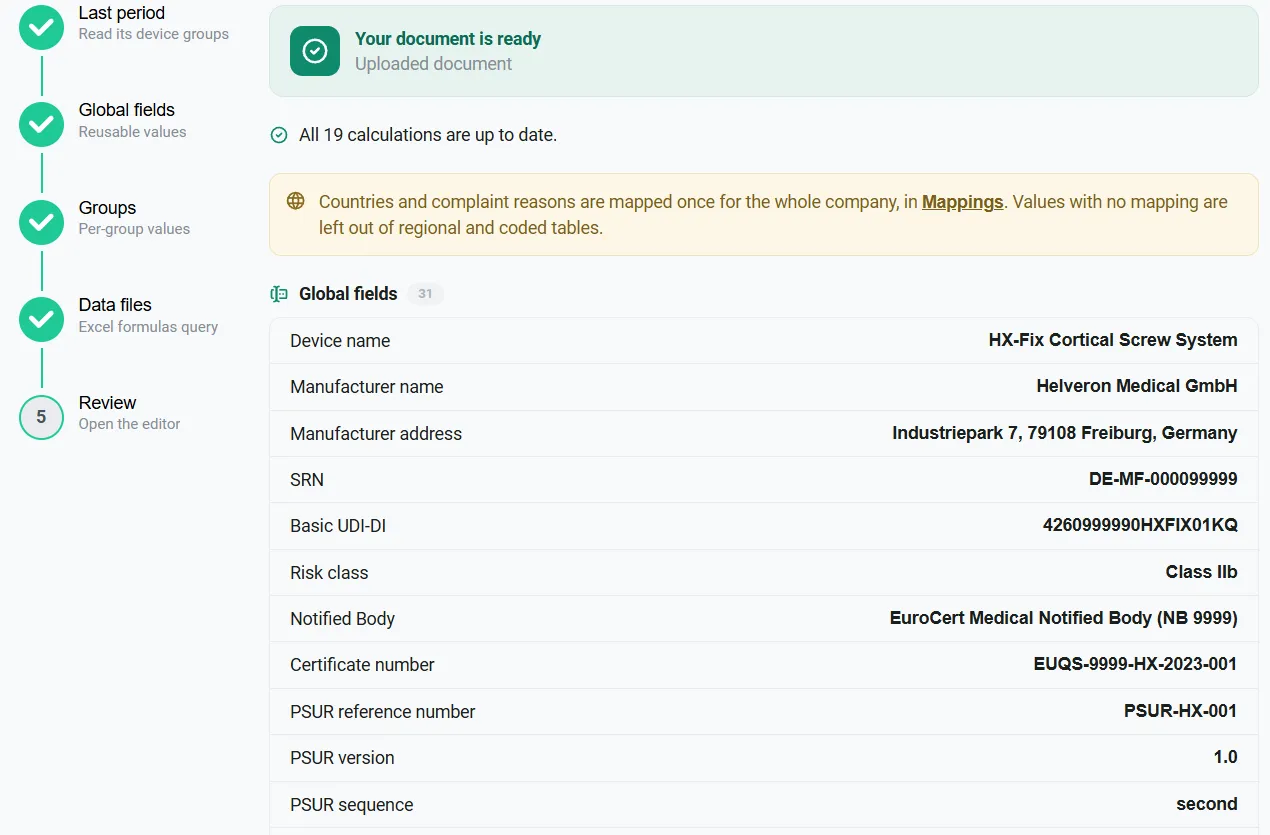
Upload the last PSUR to bring over its device groups, then fill in the report details: manufacturer, device, reporting period, classification, and each group's UDI-DI and Basic UDI-DI.
-
Upload this period's data
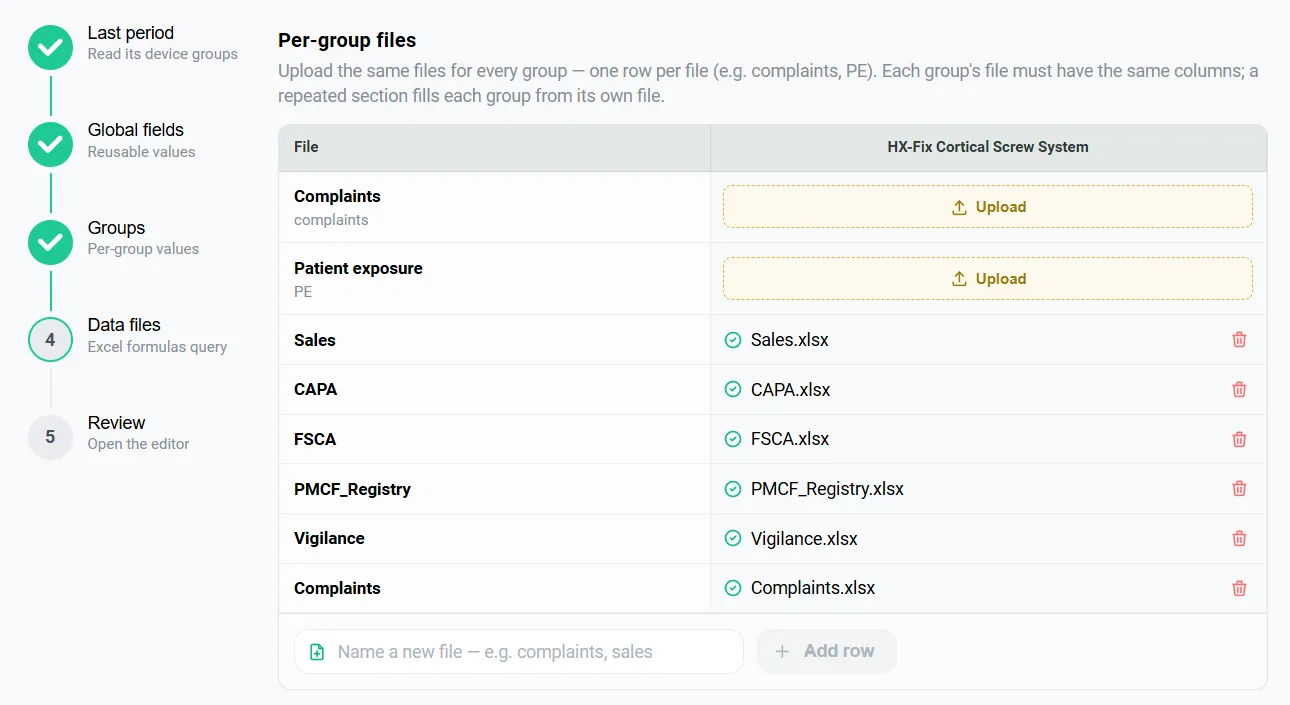
The data files step lists every file your formulas need, by name, for each device group. Upload them once, and a single background run calculates every table, chart and summary.
-
Review and edit in place
Numbers that come from your data are highlighted in the document. Edit paragraphs, table cells and tick boxes directly; anything that can't be calculated for a device group is flagged.
-
Download in Word
The Word download is available once every number is up to date, so the report never mixes old and new figures.
What PSUR Wizard does
Tables from a plain-English request
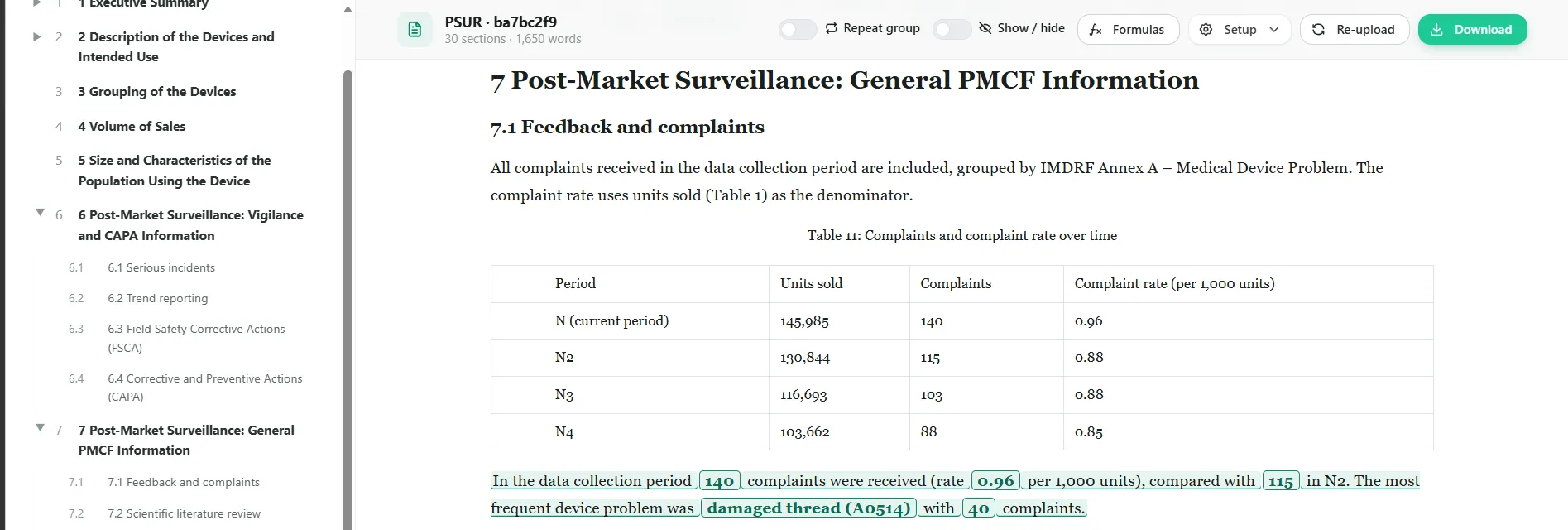
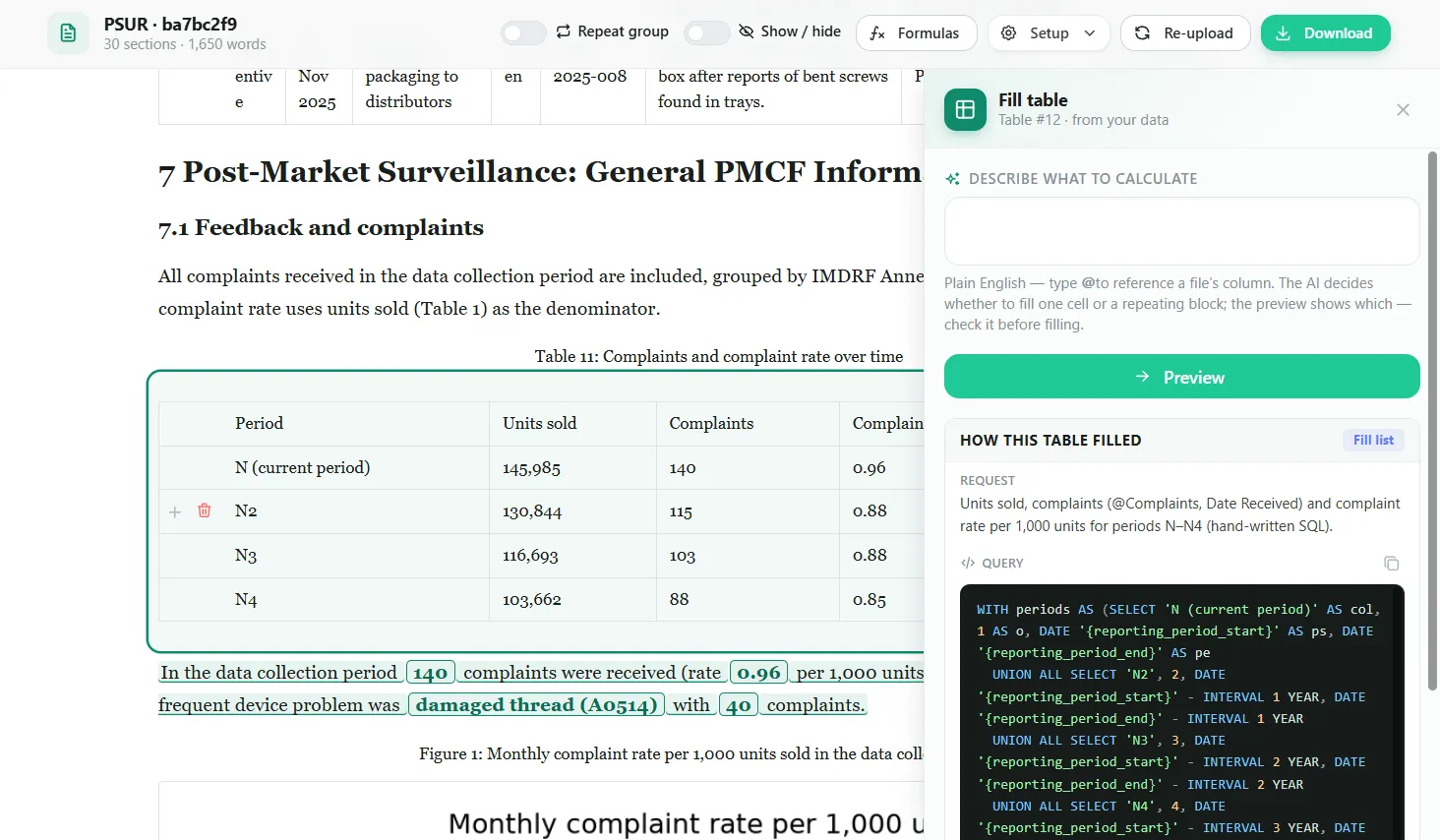
Describe what to calculate and type @ to pick a column from your data files. Preview the result before it fills the table, and see the request and query behind every table later.
Summaries with live numbers
Summary text holds named values calculated from your data, so the sentences update when the data does. AI can polish the wording, and the numbers stay locked.
Re-upload, and the whole PSUR updates
Upload corrected or new data and every table, chart and summary recalculates. For the next period, the structure and wording you approved stay in place.
Built for device groups
Sections repeat for each device group with that group's own numbers, appear or disappear by rule, and can use shared files, all groups combined, or a single group.
Charts from your data
Charts such as the monthly complaint rate are drawn from the same data files, so they always match the tables and the text.
Clear status, safe download
You always see whether numbers are calculating, waiting for data or need attention, for each device group. Changes are recorded in the audit trail.
Inside PSUR Wizard
PSUR Wizard questions
What is a PSUR?
A Periodic Safety Update Report (PSUR) is required by Article 86 of the EU Medical Device Regulation (MDR 2017/745). It summarises the post-market surveillance data for a device over the reporting period, including sales, complaints, serious incidents and field safety corrective actions, and the conclusions of the benefit-risk determination.
Which devices need a PSUR, and how often?
Under EU MDR Article 86, manufacturers of Class IIa, IIb and III devices prepare a PSUR. For Class IIb and III devices it is updated at least every year; for Class IIa devices, when necessary and at least every two years.
Can we use our own PSUR template?
Yes. We build your existing PSUR document into a template and publish it to your company, so reports keep the structure and wording your team already uses. Templates can also follow the MDCG 2022-21 guidance on PSURs.
What data do we need?
Exports of your sales and complaint data for the reporting period, plus patient exposure and any other sources your template reports on, such as vigilance, FSCA, CAPA or PMCF data. The data files step lists exactly which files each device group needs.
Does the AI write the PSUR for us?
No. Every number is calculated from your data, and you can see the request and query behind each table. AI turns your plain-English request into a query that you preview before it fills a table, and can polish summary wording while the numbers stay locked. Your team reviews and decides on the content.
What happens when our data changes?
Re-upload the data file and the whole PSUR recalculates: tables, charts and the numbers in every summary. The Word download is available again once every number is up to date.
What format is the finished report?
A Word document (.docx), so it fits your existing review, signature and submission process.
Get in Touch With Us
Reach out to us for any inquiries or collaborations. We are eager to hear from you and discuss how we can assist in leveraging healthcare data solutions for your business.